
Last updated on
Oct 31, 2026

Amicus Systems 401K 2008-2026 free printable template
pdfFiller is not affiliated with any government organization

Fill out
Complete the form online in a simple drag-and-drop editor.

eSign
Add your legally binding signature or send the form for signing.

Share
Share the form via a link, letting anyone fill it out from any device.

Export
Download, print, email, or move the form to your cloud storage.
Why pdfFiller is the best tool for your documents and forms


End-to-end document management
From editing and signing to collaboration and tracking, pdfFiller has everything you need to get your documents done quickly and efficiently.
Accessible from anywhere
pdfFiller is fully cloud-based. This means you can edit, sign, and share documents from anywhere using your computer, smartphone, or tablet.
Secure and compliant
pdfFiller lets you securely manage documents following global laws like ESIGN, CCPA, and GDPR. It's also HIPAA and SOC 2 compliant.
What is Amicus Systems 401K
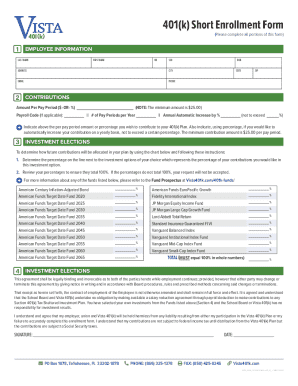
The Amicus Systems 401k Enrollment Form is a payroll document used by employees to enroll in the company's 401k retirement plan.
pdfFiller scores top ratings on review platforms




Overall good experience. Had a little trouble printing the document.
Very prompt with explanation. The trick is whether or not I understand and can do it.
Who needs Amicus Systems 401K?
Explore how professionals across industries use pdfFiller.

Amicus Systems 401K is needed by:
-
New employees looking to participate in the 401k plan
-
Current employees updating their contribution percentages
-
HR personnel managing employee benefits
-
Financial advisors assisting employees with retirement planning
-
Payroll administrators processing deductions
-
Plan administrators maintaining records
Comprehensive Guide to Amicus Systems 401K
Understanding the Amicus Systems 401k Enrollment Form
The Amicus Systems 401k Enrollment Form is critical for employees as it facilitates retirement planning. This form acts as a bridge between employees and their retirement savings plan, ensuring that they can effectively contribute to their future financial stability. Filling out this form accurately is essential, as it directly impacts the retirement benefits one can secure.
Employees must recognize that the details provided in the 401k enrollment form, such as contribution amounts and investment choices, play a pivotal role in shaping their retirement savings plan.
Purpose and Benefits of the Amicus Systems 401k Enrollment Form
The primary purpose of the Amicus Systems 401k Enrollment Form is to guide employees in enrolling in the company's 401k plan. Engaging with this form offers several advantages, including tax benefits and potential employer matching contributions.
Moreover, utilizing this form simplifies the enrollment process, allowing employees to efficiently manage their retirement savings with ease and confidence.
Key Features of the Amicus Systems 401k Enrollment Form
This form includes several key features designed to enhance usability and efficiency. Required fields encompass personal details, investment choices, and signatures, ensuring comprehensive submission.
Additionally, the form supports digital fillable fields, contributing to an intuitive user experience. This functionality allows employees to conveniently complete the 401k contribution form online, streamlining the overall process.
Who Needs the Amicus Systems 401k Enrollment Form?
The Amicus Systems 401k Enrollment Form is designed for new employees and current participants who wish to adjust their contributions. It is crucial for employees to be aware of their eligibility criteria, ensuring that they are meeting the specific requirements associated with the retirement savings plan.
How to Fill Out the Amicus Systems 401k Enrollment Form Online (Step-by-Step)
To complete the Amicus Systems 401k Enrollment Form online, follow these steps:
-
Enter your name, address, and Social Security Number (SSN).
-
Select your contribution percentage and investment options.
-
Review all fields for accuracy before proceeding.
-
Submit the form by following the designated submission methods.
Pay close attention to common errors, such as incorrect SSN or contribution percentages, to ensure a seamless completion process.
Signing and Submitting the Amicus Systems 401k Enrollment Form
Upon completing the Amicus Systems 401k Enrollment Form, signing it is the next crucial step. Employees can choose between a digital signature or a wet signature, depending on their preference.
Various submission methods are available, including email and traditional paper submission, catering to different employee needs.
Post-Submission: What to Expect After Submitting the Amicus Systems 401k Enrollment Form
After submitting the 401k enrollment form, employees can expect a processing period before receiving confirmation of their enrollment. It is advisable to check the status of the submission to ensure that all information has been accurately processed.
Being proactive in addressing any potential issues will help keep the retirement savings plan on track.
Security and Compliance for the Amicus Systems 401k Enrollment Form
Security is paramount when filling out the Amicus Systems 401k Enrollment Form. pdfFiller implements robust security measures, including 256-bit encryption, to protect sensitive information. Compliance with HIPAA and GDPR standards further assures employees that their data will be handled securely throughout the process.
Using pdfFiller to Simplify the Amicus Systems 401k Enrollment Form Experience
pdfFiller enhances the experience of completing the Amicus Systems 401k Enrollment Form through its versatile platform. Features such as editing, eSigning, and saving options empower users to manage the form effectively and intuitively.
By utilizing pdfFiller, employees can enjoy a seamless experience that simplifies the entire process of filling out the 401k contribution form.
Visual Example of a Completed Amicus Systems 401k Enrollment Form
For visual learners, a sample image of a correctly filled-out Amicus Systems 401k Enrollment Form can provide valuable guidance. This example includes annotations that explain each section and clarify the significance of the information provided, contributing to a better understanding of how to complete the form.
How to fill out the Amicus Systems 401K
-
1.To begin, access the Amicus Systems 401k Enrollment Form on pdfFiller by searching for the form name in the document library or by using a direct link from your HR department.
-
2.Open the form by clicking on it, allowing the pdfFiller interface to load the document fully.
-
3.Before filling out the form, gather necessary personal information such as your Employee Name, Address, Social Security Number, and your desired contribution percentage.
-
4.Navigate through the fillable fields using your mouse or keyboard. Click on each field to enter the required information, ensuring accuracy as you input your details.
-
5.Fill in checkboxes for investment options and other choices as indicated in the form’s instructions.
-
6.Once all fields are complete, review your entries meticulously for any errors or omissions. Make sure all required sections are filled out appropriately.
-
7.After verifying your information, provide your digital signature in the designated signature field. Make sure to comply with any signing requirements.
-
8.Finally, save your form to your pdfFiller account. You can also choose to download it as a PDF on your device or submit it directly through the platform if applicable.

Who is eligible to use the Amicus Systems 401k Enrollment Form?
Employees of Amicus Systems who wish to enroll in the company's 401k retirement plan are eligible to use this form. It’s essential for both new employees and current employees wishing to make changes.
Are there any deadlines for submitting the 401k Enrollment Form?
Submission deadlines can vary based on payroll cycles or company policies. It’s important to check with your HR department regarding specific deadlines to ensure you enroll on time.
How should I submit the completed 401k Enrollment Form?
Completed forms can be submitted electronically through pdfFiller if your company has set up a submission process. Otherwise, you may need to print and submit the form physically to your HR department.
What supporting documents are needed with the 401k Enrollment Form?
Typically, no supporting documents are required when submitting the 401k Enrollment Form. However, confirm with your HR to see if additional information is needed based on your personal circumstances.
What common mistakes should I avoid when filling out the form?
Common mistakes include missing signatures, incorrect Social Security Numbers, and failing to complete all required fields. Double-check your entries to avoid these errors.
How long does it take for the 401k Enrollment Form to be processed?
Processing times may vary, but generally, enrollment forms are processed within a few business days after submission. For updates, it’s best to contact your HR department.
What if I want to change my contributions after submitting the form?
You can change your contributions by submitting a new 401k Enrollment Form. However, make sure to follow any guidelines set by your company regarding frequency and submission.
Related Content
Related Forms



Related Catalogs
Get the latest insights from our blog



If you believe that this page should be taken down, please follow our DMCA take down process
here
.
This form may include fields for payment information. Data entered in these fields is not covered by PCI DSS compliance.